
If you are part of a Discord community, you have probably seen messages displaying dates and times that automatically adjust to your local time. These are called Discord timestamps.
Discord timestamps make it easier to organize events, schedule gaming sessions, announce meetings, share deadlines, and coordinate activities with people from different countries.
Instead of manually converting time zones or asking everyone to calculate when an event starts, you can share a single timestamp. Discord automatically displays the correct local date and time for each person viewing the message.
In this guide, we will explain what Discord timestamps are, how they work, how to create them, and how to use different timestamp formats with practical examples.
What Are Discord Timestamps?
Discord timestamps are special date and time codes that Discord converts into readable dates and times. They use Unix timestamps to represent a specific moment in time.
For example, you might want to announce a community meeting scheduled for November 15, 2026, at 10:30 AM UTC.
Instead of writing the date and time manually, you can use this Discord timestamp:
<t:1794738600:F>
When you send this code in a Discord message, Discord automatically displays the corresponding date and time according to each viewer’s local timezone and language settings.
This is particularly useful for international communities where members live in different countries and follow different time zones.
Why Are Discord Timestamps Useful?
Discord timestamps solve a common problem for online communities: scheduling activities across different time zones.
Imagine that you are organizing an online gaming event. You live in India, another member lives in the United States, and someone else lives in the United Kingdom.
If you announce that the event starts at 8:00 PM in your local time, other members need to convert that time themselves.
With a Discord timestamp, everyone sees the same event at the correct local time automatically.
Here are some common situations where Discord timestamps are useful:
- Gaming events: Share tournament schedules, raids, gaming sessions, and competitions.
- Community announcements: Inform members about upcoming events, launches, and activities.
- Meetings: Coordinate team meetings, online discussions, and voice chats.
- Reminders: Show when an event, deadline, or scheduled activity is approaching.
- Server maintenance: Announce maintenance start times and expected completion times.
- Giveaways: Display giveaway closing dates and winner announcement times.
- Study groups: Coordinate online classes, study sessions, and group discussions.
How Do Discord Timestamps Work?
Discord timestamps use Unix time, also known as Unix epoch time.
Unix time represents the number of seconds that have passed since January 1, 1970, at 00:00:00 UTC.
Every moment has a corresponding Unix timestamp. Discord uses this number to identify the exact date and time that should be displayed.
A Discord timestamp follows this structure:
<t:UNIX_TIMESTAMP:FORMAT>
There are three main components:
- <t: Identifies the text as a Discord timestamp.
- UNIX_TIMESTAMP: Represents the date and time in Unix seconds.
- FORMAT: Determines how Discord displays the date or time.
For example:
<t:1794738600:F>
Here, 1794738600 is the Unix timestamp, and F tells Discord to display the full date and time, including the weekday.
You can also use a timestamp without specifying a format:
<t:1794738600>
Discord uses its default date and time format when the formatting character is omitted.
How to Create a Discord Timestamp
There are several ways to create Discord timestamps. You can use Discord’s built-in time entry feature where available, manually create timestamp codes, or use an online Discord timestamp generator.
1. Create a Timestamp Directly in Discord
Discord provides a convenient way to create timestamps using its time entry feature in supported clients.
To try this method:
- Open Discord and navigate to a text channel or direct message.
- Type @time in the message box.
- Choose a suggested date and time or enter the time you want.
- Select the available display format.
- Send your message.
Discord provides timestamp suggestions that can display a full date, short date, time, or relative time.
The available suggestions and interface may depend on your Discord client and version.
2. Create a Discord Timestamp Manually
You can also create a Discord timestamp manually using the Unix timestamp format.
For example:
<t:1794738600:F>
Copy this syntax into a Discord message and replace the number with the Unix timestamp for your desired date and time.
You can change the final character to select a different display format.
Although this method gives you complete control over the timestamp format, you need to know the correct Unix timestamp value.
3. Use an Online Discord Timestamp Generator
An online Discord timestamp generator is one of the easiest ways to create timestamps without calculating Unix time manually.
You simply select a date, time, and timezone. The tool generates the corresponding Discord timestamp code, which you can copy and paste into your Discord message.
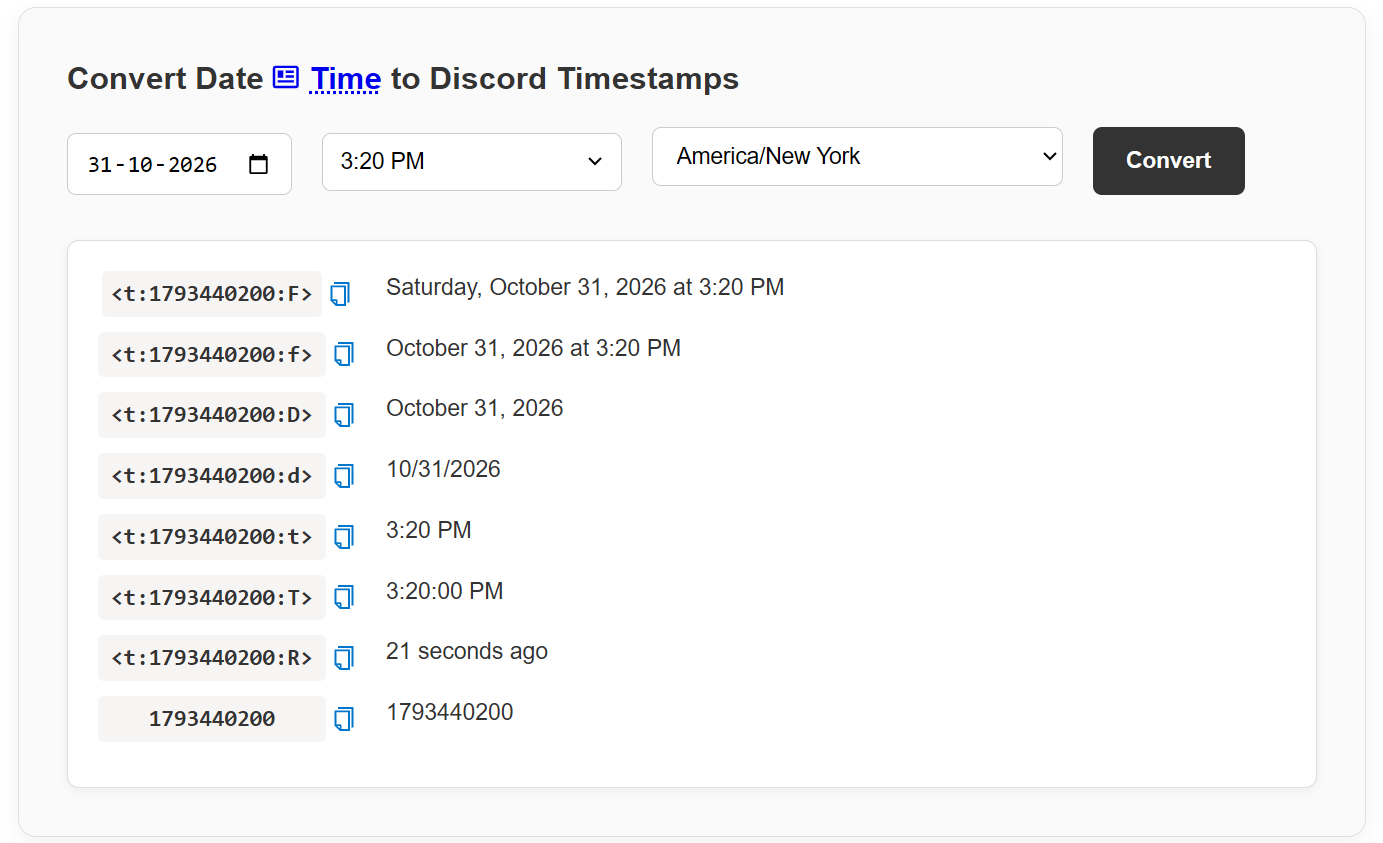
To create a timestamp using EpochConvert:
- Open the EpochConvert Discord Timestamp Converter.
- Select your desired date and time.
- Choose the appropriate timezone.
- View the generated Discord timestamp formats.
- Copy the format you want to use.
- Paste it into your Discord message.
This method is particularly useful when planning future events or creating announcements for international communities.
Understanding Different Discord Timestamp Formats
Discord supports nine timestamp formatting styles. Each format displays the same date and time differently.
You can choose a format depending on whether you want to display only the time, a complete date, or a relative countdown.
| Format | Description | Usage |
|---|---|---|
| t | Short Time | Displays hours and minutes. |
| T | Medium Time | Displays hours, minutes, and seconds. |
| d | Short Date | Displays a numeric date. |
| D | Long Date | Displays the month, day, and year. |
| f | Long Date and Short Time | Displays a date and time. |
| F | Full Date and Short Time | Includes the weekday. |
| s | Short Date and Short Time | Displays a compact date and time. |
| S | Short Date and Medium Time | Displays a compact date and time with seconds. |
| R | Relative Time | Displays time relative to the present. |
Here are examples using the same Unix timestamp:
<t:1794738600:t>
<t:1794738600:T>
<t:1794738600:d>
<t:1794738600:D>
<t:1794738600:f>
<t:1794738600:F>
<t:1794738600:s>
<t:1794738600:S>
<t:1794738600:R>
Remember that the formatting characters are case-sensitive. For example, t and T produce different results.
Practical Discord Timestamp Examples
Here are some examples showing how you can use timestamps in everyday Discord messages.
1. Announcing a Community Event
When organizing a community event, use a full date and time format so members can easily identify the scheduled date.
Our next community event is scheduled for:

<t:1794738600:F>

Everyone is welcome!
2. Sharing a Gaming Tournament Schedule
Gaming communities can use Discord timestamps to announce tournament start times.
The gaming tournament starts:

<t:1794738600:F>

Please join the server before the event begins.
3. Creating a Countdown Reminder
The relative timestamp format is particularly useful when you want to show how much time remains before an event.
Our live session starts <t:1794738600:R>!
Discord automatically displays the relative time, such as “in 2 hours” or “in 3 days”, depending on when the message is viewed.
4. Announcing Server Maintenance
Server administrators can use two timestamps to communicate the beginning and end of scheduled maintenance.
Scheduled server maintenance:

Start: <t:1794738600:F>

Expected completion: <t:1794745800:F>

Thank you for your patience.
5. Sharing a Meeting Schedule
Discord timestamps are also useful for remote teams and online study groups.
Our next team meeting:

<t:1794738600:f>

Please join the voice channel on time.
Do Discord Timestamps Automatically Convert Time Zones?
Yes. One of the biggest advantages of Discord timestamps is automatic timezone conversion.
When you share a timestamp, Discord identifies the exact moment using Unix time and displays it according to the timezone and locale settings of the person viewing the message.
For example, imagine that you schedule a meeting for 10:30 AM UTC.
- A member in India sees the corresponding time in Indian Standard Time.
- A member in the United Kingdom sees the corresponding UK local time.
- A member in the United States sees the corresponding time in their local timezone.
- A member in Japan sees the corresponding Japanese local time.
Everyone receives the same event information without needing to calculate timezone differences manually.
This also helps avoid confusion when daylight saving time changes occur, provided the original timestamp represents the correct intended moment.
Common Discord Timestamp Problems and How to Fix Them
Although Discord timestamps are easy to use, you may sometimes encounter problems when creating or sharing them.
Timestamp Displays as Plain Text
If Discord displays the timestamp code instead of converting it into a date, check that the syntax is correct.
Make sure the code includes the opening and closing angle brackets and the correct timestamp marker.
Incorrect Date or Time
If the displayed date or time is incorrect, verify that you generated the Unix timestamp for the intended date and timezone.
Also check whether you accidentally used milliseconds instead of seconds. Discord expects Unix timestamps in seconds.
Wrong Timestamp Format
Check the formatting character at the end of the timestamp. Remember that uppercase and lowercase characters have different meanings.
For example, the t format displays a short time, while T includes seconds.
Relative Time Is Not What You Expected
The R format calculates the difference between the timestamp and the current time. Make sure the Unix timestamp represents the correct future or past date.
Frequently Asked Questions About Discord Timestamps
Are Discord timestamps available to everyone?
Yes. Discord timestamp formatting can be used in ordinary messages. You do not need a special subscription or a bot to use manually created timestamp codes.
Can I create a Discord timestamp without a bot?
Yes. You can manually enter the timestamp syntax or use an online Discord timestamp generator. Bots are optional.
Do Discord timestamps work in different countries?
Yes. Discord automatically displays the same timestamp according to each viewer’s local timezone and locale. This makes timestamps useful for international communities.
What is the difference between a Unix timestamp and a Discord timestamp?
A Unix timestamp is a numeric value representing a specific moment in time. A Discord timestamp combines that number with Discord’s special formatting syntax to display a readable date or time in a Discord message.
Which Discord timestamp format should I use?
The F format is useful for complete event announcements because it includes the weekday, date, and time. The R format is useful for countdowns and reminders. The f format is a good general-purpose option.
Can Discord timestamps display seconds?
Yes. The T format displays the time with seconds, while the S format displays a short date and time with seconds.
Do Discord timestamps update automatically?
Yes. Relative timestamps using the R format adjust as time passes. Absolute date and time formats continue to represent the same moment.
Conclusion
Discord timestamps are a simple but useful feature for anyone who manages a Discord server, participates in online communities, or regularly coordinates activities with people in different countries.
Whether you are announcing a gaming tournament, scheduling a meeting, sharing an event date, or creating a countdown reminder, timestamps make communication easier by automatically displaying the correct local time for each member.
You can create timestamps manually, use Discord’s available time entry features, or generate them using an online tool.
If you want to create Discord timestamps quickly, try the EpochConvert Discord Timestamp Converter. You can select a date and time, generate different Discord timestamp formats, and copy the result directly into your Discord messages.