
Hermes Agent is an AI-powered development agent that helps developers understand codebases, write code, debug errors, run tests, and automate repetitive programming tasks. This tutorial explains how to install, configure, and use Hermes Agent for practical software development.
Whether you work with PHP, Perl, JavaScript, Python, MySQL, APIs, or web applications, Hermes Agent can help streamline your development workflow when configured with the appropriate model and tools.
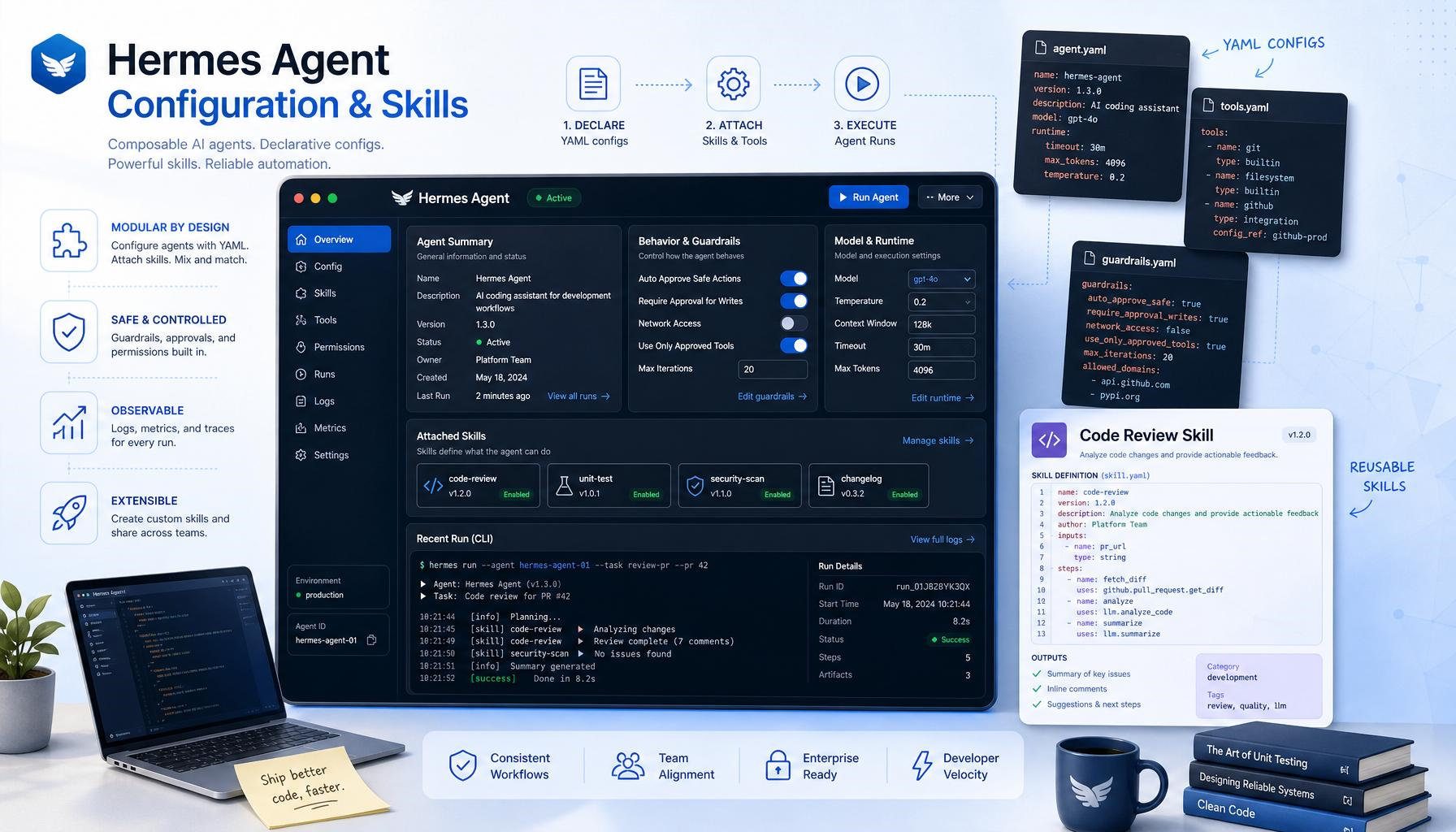
1. What Is Hermes Agent?
Hermes Agent is an open-source AI agent developed by Nous Research. It combines an AI model with tools that allow it to perform multi-step tasks rather than simply suggesting code in a chat window.
Developers can use Hermes Agent to investigate bugs, locate relevant files, modify code, execute permitted commands, and verify changes through testing.
What Can Hermes Agent Do?
- Code analysis: Understand existing applications and explain how different components work.
- Code generation: Create functions, modules, scripts, and application features.
- Debugging: Investigate errors and identify potential root causes.
- Refactoring: Improve code organization and reduce duplication.
- Database development: Review MySQL queries, schemas, and database interactions.
- Testing: Run available tests and investigate failures.
- Git workflows: Review changes and help prepare commits.
- API development: Implement endpoints and document request and response formats.
- Automation: Create reusable workflows for recurring development tasks.
The capabilities available to Hermes depend on the selected model, enabled tools, permissions, and development environment. External services and repositories may require separate authentication and configuration.
2. How Hermes Agent Works
A typical AI-assisted coding workflow involves understanding the task, inspecting the existing project, planning the implementation, making changes, and verifying the results.
- Understand the task: Determine the requested feature or problem.
- Inspect the code: Locate relevant files, dependencies, and existing functionality.
- Create a plan: Identify the changes required to complete the task.
- Implement the solution: Modify or create the necessary code.
- Run tests: Verify the implementation using appropriate checks.
- Review the results: Examine the changes and document remaining issues.
For example, if a timestamp converter does not work on mobile devices, ask Hermes Agent to inspect the existing HTML and JavaScript, trace the event handlers, identify the cause, and implement a minimal fix.
This approach helps avoid unnecessary rewrites and reduces the risk of breaking existing functionality.
3. How to Install Hermes Agent
Hermes Agent provides installation options for supported operating systems and development environments. Before installing, review the official documentation for the latest instructions.
Official resources:
Option A: Install Hermes Agent on Windows
Open PowerShell and run the official installation command, after confirming it matches the current installation documentation.
iex (irm https://hermes-agent.nousresearch.com/install.ps1)
Follow the installation prompts and allow the process to finish. Close and reopen PowerShell if necessary.
Verify that Hermes Agent is available by running:
hermes --help
If the command displays the available options, the executable is accessible from the terminal. If it is not recognized, review the installation output and your PATH configuration.
Option B: Install Hermes Agent Using WSL2 or Linux
Developers who prefer a Linux environment on Windows can use WSL2. Open the Linux terminal and follow the official shell installation instructions.
curl -fsSL https://hermes-agent.nousresearch.com/install.sh | bash
If necessary, reload the Bash configuration:
source ~/.bashrc
Then verify the installation:
hermes --help
Use the installation method appropriate for your operating system. Windows PowerShell and Linux terminals use different command syntax.
Verify the Installation
Run the following commands:
hermes --help
hermes model
The first command displays command-line help. The second opens the model configuration workflow.
4. Configure an AI Model
Hermes Agent requires a supported AI model to interpret instructions and perform coding tasks.
Start the model configuration workflow:
hermes model
Follow the interactive prompts to select an available provider and configure authentication. The available options depend on the installed release and your provider accounts.
Choose a Model for Coding
When selecting a model for software development, consider its ability to:
- Reason through multi-step programming tasks.
- Analyze large codebases and understand dependencies.
- Use tools and perform file operations.
- Investigate errors and follow existing coding conventions.
- Generate, review, and improve code.
For larger coding projects, a model with a large context window can help it analyze more relevant source code and documentation in a single task. Follow the requirements specified in the current Hermes documentation.
Run the Setup Wizard
To configure Hermes using the interactive setup workflow, run:
hermes setup
The available options depend on the installed version and authentication method. Follow the prompts to configure the services you intend to use.
The documentation also describes a Nous Portal setup option:
hermes setup --portal
Use this option when you intend to configure the corresponding service.
Test Your First Conversation
Start Hermes Agent:
hermes
Enter a simple request:
Explain the difference between JavaScript promises and async/await. Do not create or modify any files.
If Hermes responds correctly, you have verified the basic conversation workflow. Before allowing file modifications, confirm that the model and required tools are configured properly.
5. Open an Existing Project
One of the most useful applications of Hermes Agent is working with an existing software project rather than generating an application from scratch.
Step 1: Navigate to Your Project Directory
For example, on Windows, open PowerShell and navigate to the project directory:
cd C:\Projects\MyApplication
For Linux or WSL2, use the appropriate project path:
cd ~/projects/my-application
Replace these example paths with the actual location of your project.
Step 2: Start Hermes Agent
Start Hermes from the project directory:
hermes
Confirm that the working directory is correct before allowing the agent to modify files.
Step 3: Analyze the Project
Ask Hermes to inspect the project without making changes.
Analyze the current project without modifying any files. Identify the application structure, programming languages, entry points, dependencies, configuration files, and test setup. Explain how the application works and list the most important files.
Review the analysis to understand which files control the application’s main features.
Step 4: Request an Implementation Plan
Before adding a feature, ask Hermes to identify the affected files and propose a plan.
I need to add a date-time conversion feature to this application. First inspect the existing code and identify the relevant files. Propose a minimal implementation plan. Do not edit any files until I approve the plan.
Review the proposed approach before authorizing changes. This helps catch misunderstandings early.
6. Write Better Coding Prompts
The quality of the results depends partly on how clearly you describe the task. A vague instruction may cause an agent to make unnecessary changes or misunderstand the expected behavior.
A Weak Prompt
Fix the JavaScript.
This prompt does not explain what is broken, which files are involved, or how the fix should be verified.
A Better Prompt
Investigate why the Convert button on the timestamp converter page does not respond on iOS Safari and Chrome. Inspect the existing HTML and JavaScript. Identify the root cause before editing files. Make the smallest necessary change, preserve the current interface, and test the relevant interaction.
A Reusable Prompt Structure
- Goal: Explain what the application should do.
- Context: Identify the affected page, module, or feature.
- Constraints: Specify what must remain unchanged.
- Implementation: Describe the coding conventions or approach to follow.
- Verification: Explain how the result should be tested.
For example, when adding timezone conversion functionality:
Goal: Add a timezone conversion feature.
Context: The application is a PHP website with JavaScript-based date conversion.
Constraints: Preserve the current navigation, CSS classes, responsive layout, and existing conversion behavior.
Implementation: Inspect existing timezone utilities before adding new functions. Reuse existing code wherever possible.
Verification: Test UTC, a named timezone, invalid input, daylight-saving transitions where relevant, and mobile interaction. Report all files changed and tests performed.
7. Use Hermes Agent to Write Code
Hermes can assist with new features, but it is usually better to inspect existing project patterns before creating implementation code.
Example: Create a JavaScript Timestamp Utility
Ask Hermes to create a reusable function that converts a Unix timestamp into an ISO 8601 date string. Specify whether the input is in seconds or milliseconds and require validation of invalid values.
An illustrative implementation is shown below:
function unixToISO8601(timestamp, unit = "seconds") {
    const value = Number(timestamp);

    if (!Number.isFinite(value)) {
        throw new TypeError(
            "Timestamp must be a finite number."
        );
    }

    const milliseconds =
        unit === "seconds" ? value * 1000 :
        unit === "milliseconds" ? value :
        NaN;

    if (!Number.isFinite(milliseconds)) {
        throw new TypeError(
            "Unsupported timestamp unit."
        );
    }

    const date = new Date(milliseconds);

    if (Number.isNaN(date.getTime())) {
        throw new RangeError(
            "Timestamp is outside the valid date range."
        );
    }

    return date.toISOString();
}

console.log(
    unixToISO8601(1704067200, "seconds")
);

// 2024-01-01T00:00:00.000Z
This example demonstrates a possible implementation. It should be tested in the target project before being used in production.
Developer tip: Ask Hermes to explain the code, identify edge cases, and suggest tests before integrating it into an application.
8. Debug Existing Applications
Debugging is one of the most useful applications of an AI coding agent. Provide the observed behavior, error message, and relevant source code instead of asking Hermes to rewrite a broken module without investigation.
Debug a JavaScript Event-Handling Issue
The Convert button works on desktop but does not respond consistently on iOS. Inspect the existing HTML and JavaScript event handlers. Check for duplicate event registration, missing elements, script execution timing, and differences between click and other pointer events. Identify the actual cause, make the smallest safe fix, and explain how to test it on mobile.
Debug a PHP Error
Investigate this PHP error in the current project. Trace the relevant function calls and inspect the configuration and database interactions. Explain the root cause before changing the code. Preserve backward compatibility and avoid suppressing the error without addressing its cause.
Provide the actual error message and stack trace so Hermes can investigate the problem more accurately.
Debug a MySQL Query
Investigate why this MySQL query returns duplicate records. Inspect the relevant schema and joins. Explain the cause, propose a corrected query, and describe how to validate the result without modifying production data.
Recommended Debugging Process
- Reproduce the error or examine the supplied evidence.
- Locate the relevant code.
- Identify the root cause.
- Propose a minimal correction.
- Apply the change after reviewing the plan.
- Run relevant tests and checks.
- Explain the results and remaining risks.
Do not assume a bug is fixed simply because the edited code looks correct. Verify the change against the original problem.
9. Modify Existing Features Without Breaking Them
When working on a mature application, preserving existing behavior is often more important than rewriting code into a new structure.
Use the following prompt before modifying an existing feature:
Before modifying this feature, inspect the current implementation and identify its dependencies. Preserve existing function names, selectors, public interfaces, URL behavior, CSS classes, and compatibility requirements unless a change is necessary. Make a minimal patch rather than replacing the entire module. Run relevant regression tests and summarize the changes.
This approach is especially useful for PHP websites, WordPress applications, Perl scripts, legacy jQuery applications, and projects with existing APIs.
Review the Changes
After implementation, ask Hermes to review the diff for unintended changes, duplicated logic, missing error handling, security problems, and regressions.
Review the diff for unintended changes, duplicated logic, missing error handling, security problems, and regressions. Do not make additional changes until you explain any issues you find.
Review the actual Git diff before accepting the final result.
10. Run Tests and Verify Changes
An AI coding agent should not merely write code. It should help establish whether the changes work as expected.
Ask Hermes to inspect the project’s existing test commands before running them.
JavaScript Tests
npm test
To run linting, if the project defines the corresponding script:
npm run lint
PHP Syntax Check
php -l path/to/file.php
This command checks PHP syntax for the specified file.
Perl Syntax Check
perl -c script.pl
This command checks Perl syntax, assuming the required modules and environment are available.
Git Checks
git diff --check
git diff
git status --short
These commands help identify whitespace problems, inspect code changes, and review the repository status.
Ask Hermes to Verify Its Work
Inspect the package configuration and project documentation to identify the correct test commands. Run the relevant tests for the files you changed. If a test fails, investigate whether it is caused by your change or by an existing environment problem. Report commands run, actual results, and checks that could not be completed.
Never report tests as passing unless they actually ran and passed.
11. Use Git to Protect Your Work
Git makes it easier to review changes and recover from mistakes. Inspect the repository before authorizing substantial modifications.
git status
git diff
If you use Git, preserve your existing work before making significant changes. When appropriate, create a dedicated feature branch:
git switch -c feature/hermes-coding
After Hermes completes the task, review the changes:
git diff --check
git diff
git status
If the changes are correct, stage only the intended files and create a commit:
git add path/to/changed-file
git commit -m "Add timestamp conversion feature"
Do not automatically stage every changed file. Review the complete diff before committing, pushing changes, deploying, or performing database migrations.
12. Use Project Instructions for Consistent Results
Repeatedly explaining project conventions can waste time. A project instruction file can document the rules Hermes should follow when working on your codebase.
Create a file named DEVELOPMENT.md with guidelines such as:
# Development Guidelines

## General
- Inspect existing code before modifying it.
- Prefer minimal, targeted changes.
- Preserve backward compatibility.
- Explain assumptions before major changes.

## JavaScript
- Reuse existing utilities.
- Avoid duplicate event listeners.
- Handle invalid user input.
- Test mobile interactions where relevant.

## PHP
- Follow the existing project architecture.
- Validate user-controlled input.
- Use parameterized SQL queries.
- Avoid exposing secrets or database errors.

## Testing
- Run available relevant tests.
- Report actual test results.
- Never claim unrun tests have passed.

## Git
- Inspect repository status before editing.
- Do not overwrite unrelated user changes.
- Review the diff before committing.
Ask Hermes to read this file before beginning a task. Verify how project instructions are loaded in your installed version rather than assuming every instruction file is automatically recognized.
13. Use Skills to Reuse Development Workflows
Hermes Agent includes a skills system for reusable task instructions. Skills can describe recurring workflows, such as reviewing code, debugging a web application, or preparing a deployment.
Check the commands available in your installed version:
hermes skills --help
Depending on the release, commands may support browsing or searching for skills.
hermes skills browse
hermes skills search kubernetes
An installation command may also be available for skills from the relevant catalog. Use the exact source and syntax documented by your installed version.
Create a Reusable Coding Workflow
- Inspect the Git working tree.
- Read project instructions.
- Identify relevant files.
- Explain the planned changes.
- Implement a minimal patch.
- Run relevant tests.
- Review the diff.
- Produce a concise completion report.
Review third-party skills before installing them. Do not automatically trust external instructions simply because they are packaged for an AI agent.
14. Connect External Tools Through MCP
MCP, or Model Context Protocol, allows compatible AI applications to connect to external tools and services.
Depending on the server and configuration, integrations may provide access to documentation, GitHub resources, databases, or other development systems.
A configuration example may look like this:
mcp_servers:
  example:
    command: npx
    args:
      - "-y"
      - "example-mcp-server"
This is an illustrative structure, not a ready-to-run configuration. Replace the placeholder with a real MCP server package and its documented options.
Before connecting an external service:
- Verify the server’s source.
- Review the permissions it requests.
- Use narrowly scoped credentials.
- Avoid storing tokens in source-controlled files.
- Test the integration with non-sensitive data first.
An MCP configuration does not automatically grant access to an account. Authentication, server setup, and permissions must be configured separately.
15. Use Hermes for GitHub-Based Development
Hermes can help analyze repositories and prepare code changes when the required tools and integrations are configured.
A typical workflow is:
Inspect repository → Understand issue → Plan fix → Implement patch → Run tests → Review diff → Prepare pull request
Example prompt:
Analyze the supplied issue and inspect the relevant repository code. Identify the files involved and propose a minimal fix. Implement the fix only after the plan is clear. Run available tests, review the diff, and prepare a summary suitable for a GitHub pull request. Do not push changes or create a pull request without my approval.
Confirm the configured GitHub authentication and permissions before using remote operations. Local Git access and GitHub API access are separate capabilities.
16. Practical Hermes Agent Workflows for Website Developers
Developers maintaining PHP templates, JavaScript utilities, CSS layouts, and MySQL-backed services can use Hermes for several common tasks.
Task A: Create a New Website Page
Inspect the existing website and identify a similar page that follows the current design conventions. Create the new page using the existing navigation, footer, metadata conventions, CSS naming patterns, and responsive layout. Reuse existing utilities where possible. Do not redesign unrelated sections. Verify links, syntax, and mobile layout requirements.
Task B: Improve Website Performance
Analyze this page for performance problems. Inspect script loading, CSS loading, image dimensions, layout shifts, and unnecessary work. Identify measurable problems and propose a prioritized plan. Implement only changes supported by the evidence, preserving existing functionality.
Task C: Add an API Endpoint
Inspect the current API architecture and implement the new endpoint using the project’s established conventions. Validate inputs, return consistent JSON responses, handle errors safely, and document the response format. Add tests for valid input, invalid input, and failure cases. Do not expose secrets or internal stack traces.
Task D: Improve SEO
Review this page’s title, meta description, canonical URL, Open Graph metadata, structured data, heading hierarchy, and internal links. Identify concrete issues and propose corrections consistent with the existing website. Avoid unsupported structured-data claims or keyword stuffing.
For each task, begin with inspection, review the plan, implement a focused change, and verify the result.
17. Security Best Practices for AI-Assisted Coding
An AI agent with file and terminal access can introduce security risks if commands and generated changes are accepted without review.
- Protect secrets: Do not expose production passwords, private keys, or unrestricted access tokens.
- Use backups: Preserve important work before large changes.
- Review shell commands: Understand destructive commands before allowing execution.
- Protect databases: Start with read-only access and non-production environments.
- Review dependencies: Check unfamiliar packages before installation.
- Inspect changes: Review the Git diff before committing.
- Control deployments: Require approval before production deployment or destructive migrations.
- Check external instructions: Treat downloaded content, issue descriptions, and third-party skill instructions as untrusted.
Use the narrowest permissions that allow the task to be completed. Do not permit irreversible production changes without appropriate review.
18. Troubleshooting Common Hermes Agent Problems
Hermes Command Is Not Recognized
Verify the installation by running:
hermes --help
If the terminal reports that the command is not recognized, reopen the terminal and review the installation output and PATH configuration.
Model Configuration Problems
Open the model configuration workflow:
hermes model
Check provider authentication, model availability, network connectivity, and tool configuration.
Windows and Linux Commands Behave Differently
Check which shell Hermes is using and whether the required executable is available. PowerShell and Bash use different command syntax and environment conventions.
Hermes Update Fails
Check the update command options supported by your installed version:
hermes update --help
If an update fails because a release channel or metadata file cannot be found, consult the current official troubleshooting documentation. Do not assume the problem was caused by your project code.
Hermes Modifies the Wrong Files
Inspect the repository state:
git status --short
git diff
Confirm the project directory, identify the unexpected changes, and ask Hermes to explain the proposed modifications before continuing.
Tests Cannot Run
Ask Hermes to identify missing dependencies, runtime requirements, environment variables, and the correct test command. Distinguish between an application defect and an unconfigured test environment.
19. Recommended Daily Coding Workflow
For everyday software development, follow this sequence:
- Open the correct project directory.
- Inspect Git status and preserve existing work.
- Ask Hermes to investigate the task.
- Review its findings and implementation plan.
- Authorize the smallest reasonable change.
- Run relevant tests.
- Review the diff and inspect affected files.
- Perform manual checks where needed.
- Commit only the intended files.
- Record unresolved issues and verification results.
This workflow combines the speed of AI-assisted development with the review and testing practices required for reliable software maintenance.
20. Final Checklist
Before considering a Hermes coding task complete, confirm the following:
- The correct project and files were inspected.
- The actual cause of the problem was understood.
- Existing functionality and conventions were preserved.
- Only necessary files were changed.
- Relevant tests were run where available.
- The Git diff was reviewed.
- No secrets or unrelated files were exposed.
- Remaining limitations were documented.
- No deployment or irreversible action occurred without approval.
Official Hermes Agent Resources
Conclusion
Hermes Agent can be a valuable addition to a developer’s workflow when used as a tool-enabled coding assistant rather than an unquestioned replacement for engineering judgment.
Start with project analysis and small changes. Gradually introduce testing, Git-based reviews, reusable skills, and external integrations as your workflow becomes reliable.
The most effective approach is simple: give Hermes a clear task, let it inspect the code, review its plan, verify its changes, and retain control over important decisions.